
Your online to-do list. A clearer day.
A free online to-do list for work and everyday life. No account needed. Tasks stay in this browser.
Open your to-do listFree to useNo account neededSaved in your browser

How it works
Get started in three simple steps.
Open your list
Open the app in your browser. No sign-up or download needed.
Get it written down
Type a task and press Enter. Add a date or details when you need them.
Make today manageable
Organize your lists, choose tasks for My Day, and check them off as you go.
Simple plans. A clearer day.
Keep everyday tasks, plans, and routines in one place.
Give today a clear focus
Choose tasks for My Day and star what matters. Keep the rest in their own lists.
Keep each part of life in order
Separate work, home, and personal plans into lists. Find tasks with a quick search.
Turn a task into a next step
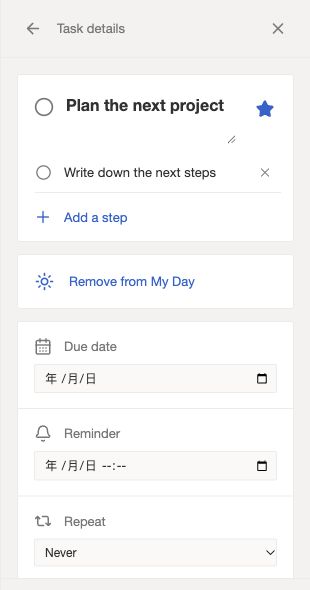
Add steps, notes, and a due date. Keep everything you need alongside the task.
Make room for your routines
Repeat tasks daily, on weekdays, weekly, or monthly. Completing one creates the next.
Simple answers before you start.
Is this online to-do list free? Do I need an account?
TodoList AI is free to use, and no sign-up is required. Open the app and start adding tasks directly in your browser.
Where are my tasks saved?
Your tasks and lists are saved locally in this browser. They are not uploaded to a task server. Clearing this site’s browser data removes them, so export a JSON backup when you need a separate copy.
Can I use the same lists on another device?
Tasks do not sync automatically between devices or browsers. In Settings, export a JSON backup, then import it on the other device. Import merges the backup into your existing lists and skips tasks with the same IDs.
Can I set due dates, repeats, and reminders?
Yes. Set due dates and daily, weekday, weekly, or monthly repeats. Completing a repeating task creates its next occurrence. Reminders show a marker inside the app; they do not send notifications when the app is closed.
Does TodoList AI generate or plan tasks with AI?
Not currently. AI is part of the product name. You create and organize your own tasks; this version does not generate tasks or plan your schedule with AI.
One less thing to keep in your head.
Start with one task. Give the rest of your day a little more room.
Open your to-do listFree to use. No sign-up required.